
Design detail
Lovable
DESIGN.md extracted from the public Lovable website. This is not the official design system. Colors, fonts, and spacing may not be 100% accurate. But it's a good starting point for building something similar.
Live preview
Theme-aware preview frame
Both light and dark preview assets are available.
Documentation
README and DESIGN in one place
Lovable Inspired Design System
DESIGN.md extracted from the public Lovable website. This is not the official design system. Colors, fonts, and spacing may not be 100% accurate. But it's a good starting point for building something similar.
Files
| File | Description |
|---|---|
DESIGN.md |
Complete design system documentation (9 sections) |
preview.html |
Interactive design token catalog (light) |
preview-dark.html |
Interactive design token catalog (dark) |
Use DESIGN.md to use as a reference for AI agents (Claude, Cursor, Stitch) to generate UI that looks like the Lovable design language.
Preview
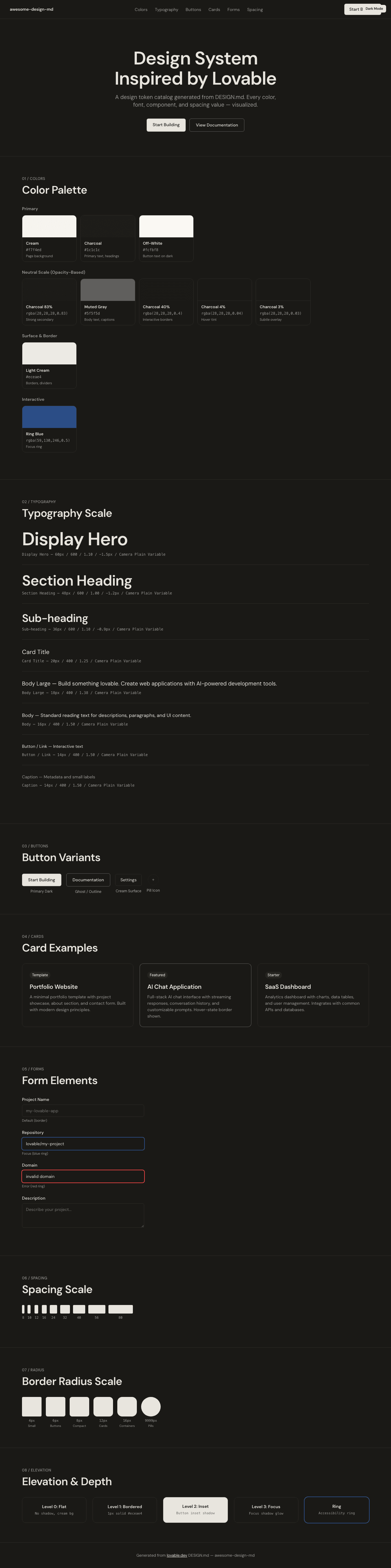
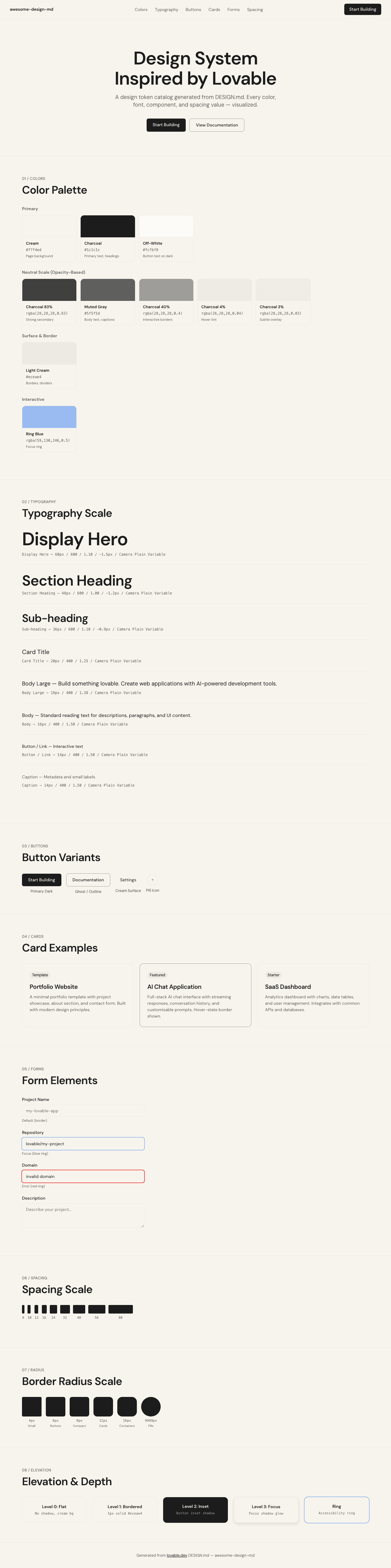
A sample landing page built with DESIGN.md. It shows the actual colors, typography, buttons, cards, spacing, and elevation, all in one page.
Dark Mode
Light Mode
Design System Inspiration of Lovable
1. Visual Theme & Atmosphere
Lovable's website radiates warmth through restraint. The entire page sits on a creamy, parchment-toned background (#f7f4ed) that immediately separates it from the cold-white conventions of most developer tool sites. This isn't minimalism for minimalism's sake — it's a deliberate choice to feel approachable, almost analog, like a well-crafted notebook. The near-black text (#1c1c1c) against this warm cream creates a contrast ratio that's easy on the eyes while maintaining sharp readability.
The custom Camera Plain Variable typeface is the system's secret weapon. Unlike geometric sans-serifs that signal "tech company," Camera Plain has a humanist warmth — slightly rounded terminals, organic curves, and a comfortable reading rhythm. At display sizes (48px–60px), weight 600 with aggressive negative letter-spacing (-0.9px to -1.5px) compresses headlines into confident, editorial statements. The font uses ui-sans-serif, system-ui as fallbacks, acknowledging that the custom typeface carries the brand personality.
What makes Lovable's visual system distinctive is its opacity-driven depth model. Rather than using a traditional gray scale, the system modulates #1c1c1c at varying opacities (0.03, 0.04, 0.4, 0.82–0.83) to create a unified tonal range. Every shade of gray on the page is technically the same hue — just more or less transparent. This creates a visual coherence that's nearly impossible to achieve with arbitrary hex values. The border system follows suit: 1px solid #eceae4 for light divisions and 1px solid rgba(28, 28, 28, 0.4) for stronger interactive boundaries.
Key Characteristics:
- Warm parchment background (
#f7f4ed) — not white, not beige, a deliberate cream that feels hand-selected - Camera Plain Variable typeface with humanist warmth and editorial letter-spacing at display sizes
- Opacity-driven color system: all grays derived from
#1c1c1cat varying transparency levels - Inset shadow technique on buttons:
rgba(255,255,255,0.2) 0px 0.5px 0px 0px inset, rgba(0,0,0,0.2) 0px 0px 0px 0.5px inset - Warm neutral border palette:
#eceae4for subtle,rgba(28,28,28,0.4)for interactive elements - Full-pill radius (
9999px) used extensively for action buttons and icon containers - Focus state uses
rgba(0,0,0,0.1) 0px 4px 12pxshadow for soft, warm emphasis - shadcn/ui + Radix UI component primitives with Tailwind CSS utility styling
2. Color Palette & Roles
Primary
- Cream (
#f7f4ed): Page background, card surfaces, button surfaces. The foundation — warm, paper-like, human. - Charcoal (
#1c1c1c): Primary text, headings, dark button backgrounds. Not pure black — organic warmth. - Off-White (
#fcfbf8): Button text on dark backgrounds, subtle highlight. Barely distinguishable from pure white.
Neutral Scale (Opacity-Based)
- Charcoal 100% (
#1c1c1c): Primary text, headings, dark surfaces. - Charcoal 83% (
rgba(28,28,28,0.83)): Strong secondary text. - Charcoal 82% (
rgba(28,28,28,0.82)): Body copy. - Muted Gray (
#5f5f5d): Secondary text, descriptions, captions. - Charcoal 40% (
rgba(28,28,28,0.4)): Interactive borders, button outlines. - Charcoal 4% (
rgba(28,28,28,0.04)): Subtle hover backgrounds, micro-tints. - Charcoal 3% (
rgba(28,28,28,0.03)): Barely-visible overlays, background depth.
Surface & Border
- Light Cream (
#eceae4): Card borders, dividers, image outlines. The warm divider line. - Cream Surface (
#f7f4ed): Card backgrounds, section fills — same as page background for seamless integration.
Interactive
- Ring Blue (
#3b82f6at 50% opacity):--tw-ring-color, Tailwind focus ring. - Focus Shadow (
rgba(0,0,0,0.1) 0px 4px 12px): Focus and active state shadow — soft, warm, diffused.
Inset Shadows
- Button Inset (
rgba(255,255,255,0.2) 0px 0.5px 0px 0px inset, rgba(0,0,0,0.2) 0px 0px 0px 0.5px inset, rgba(0,0,0,0.05) 0px 1px 2px 0px): The signature multi-layer inset shadow on dark buttons.
3. Typography Rules
Font Family
- Primary:
Camera Plain Variable, with fallbacks:ui-sans-serif, system-ui - Weight range: 400 (body/reading), 480 (special display), 600 (headings/emphasis)
- Feature: Variable font with continuous weight axis — allows fine-tuned intermediary weights like 480.
Hierarchy
| Role | Font | Size | Weight | Line Height | Letter Spacing | Notes |
|---|---|---|---|---|---|---|
| Display Hero | Camera Plain Variable | 60px (3.75rem) | 600 | 1.00–1.10 (tight) | -1.5px | Maximum impact, editorial |
| Display Alt | Camera Plain Variable | 60px (3.75rem) | 480 | 1.00 (tight) | normal | Lighter hero variant |
| Section Heading | Camera Plain Variable | 48px (3.00rem) | 600 | 1.00 (tight) | -1.2px | Feature section titles |
| Sub-heading | Camera Plain Variable | 36px (2.25rem) | 600 | 1.10 (tight) | -0.9px | Sub-sections |
| Card Title | Camera Plain Variable | 20px (1.25rem) | 400 | 1.25 (tight) | normal | Card headings |
| Body Large | Camera Plain Variable | 18px (1.13rem) | 400 | 1.38 | normal | Introductions |
| Body | Camera Plain Variable | 16px (1.00rem) | 400 | 1.50 | normal | Standard reading text |
| Button | Camera Plain Variable | 16px (1.00rem) | 400 | 1.50 | normal | Button labels |
| Button Small | Camera Plain Variable | 14px (0.88rem) | 400 | 1.50 | normal | Compact buttons |
| Link | Camera Plain Variable | 16px (1.00rem) | 400 | 1.50 | normal | Underline decoration |
| Link Small | Camera Plain Variable | 14px (0.88rem) | 400 | 1.50 | normal | Footer links |
| Caption | Camera Plain Variable | 14px (0.88rem) | 400 | 1.50 | normal | Metadata, small text |
Principles
- Warm humanist voice: Camera Plain Variable gives Lovable its approachable personality. The slightly rounded terminals and organic curves contrast with the sharp geometric sans-serifs used by most developer tools.
- Variable weight as design tool: The font supports continuous weight values (e.g., 480), enabling nuanced hierarchy beyond standard weight stops. Weight 480 at 60px creates a display style that feels lighter than semibold but stronger than regular.
- Compression at scale: Headlines use negative letter-spacing (-0.9px to -1.5px) for editorial impact. Body text stays at normal tracking for comfortable reading.
- Two weights, clear roles: 400 (body/UI/links/buttons) and 600 (headings/emphasis). The narrow weight range creates hierarchy through size and spacing, not weight variation.
4. Component Stylings
Buttons
Primary Dark (Inset Shadow)
- Background:
#1c1c1c - Text:
#fcfbf8 - Padding: 8px 16px
- Radius: 6px
- Shadow:
rgba(0,0,0,0) 0px 0px 0px 0px, rgba(0,0,0,0) 0px 0px 0px 0px, rgba(255,255,255,0.2) 0px 0.5px 0px 0px inset, rgba(0,0,0,0.2) 0px 0px 0px 0.5px inset, rgba(0,0,0,0.05) 0px 1px 2px 0px - Active: opacity 0.8
- Focus:
rgba(0,0,0,0.1) 0px 4px 12pxshadow - Use: Primary CTA ("Start Building", "Get Started")
Ghost / Outline
- Background: transparent
- Text:
#1c1c1c - Padding: 8px 16px
- Radius: 6px
- Border:
1px solid rgba(28,28,28,0.4) - Active: opacity 0.8
- Focus:
rgba(0,0,0,0.1) 0px 4px 12pxshadow - Use: Secondary actions ("Log In", "Documentation")
Cream Surface
- Background:
#f7f4ed - Text:
#1c1c1c - Padding: 8px 16px
- Radius: 6px
- No border
- Active: opacity 0.8
- Use: Tertiary actions, toolbar buttons
Pill / Icon Button
- Background:
#f7f4ed - Text:
#1c1c1c - Radius: 9999px (full pill)
- Shadow: same inset pattern as primary dark
- Opacity: 0.5 (default), 0.8 (active)
- Use: Additional actions, plan mode toggle, voice recording
Cards & Containers
- Background:
#f7f4ed(matches page) - Border:
1px solid #eceae4 - Radius: 12px (standard), 16px (featured), 8px (compact)
- No box-shadow by default — borders define boundaries
- Image cards:
1px solid #eceae4with 12px radius
Inputs & Forms
- Background:
#f7f4ed - Text:
#1c1c1c - Border:
1px solid #eceae4 - Radius: 6px
- Focus: ring blue (
rgba(59,130,246,0.5)) outline - Placeholder:
#5f5f5d
Navigation
- Clean horizontal nav on cream background, fixed
- Logo/wordmark left-aligned (128.75 x 22px)
- Links: Camera Plain 14–16px weight 400,
#1c1c1ctext - CTA: dark button with inset shadow, 6px radius
- Mobile: hamburger menu with 6px radius button
- Subtle border or no border on scroll
Links
- Color:
#1c1c1c - Decoration: underline (default)
- Hover: primary accent (via CSS variable
hsl(var(--primary))) - No color change on hover — decoration carries the interactive signal
Image Treatment
- Showcase/portfolio images with
1px solid #eceae4border - Consistent 12px border radius on all image containers
- Soft gradient backgrounds behind hero content (warm multi-color wash)
- Gallery-style presentation for template/project showcases
Distinctive Components
AI Chat Input
- Large prompt input area with soft borders
- Suggestion pills with
#eceae4borders - Voice recording / plan mode toggle buttons as pill shapes (9999px)
- Warm, inviting input area — not clinical
Template Gallery
- Card grid showing project templates
- Each card: image + title,
1px solid #eceae4border, 12px radius - Hover: subtle shadow or border darkening
- Category labels as text links
Stats Bar
- Large metrics: "0M+" pattern in 48px+ weight 600
- Descriptive text below in muted gray
- Horizontal layout with generous spacing
5. Layout Principles
Spacing System
- Base unit: 8px
- Scale: 8px, 10px, 12px, 16px, 24px, 32px, 40px, 56px, 80px, 96px, 128px, 176px, 192px, 208px
- The scale expands generously at the top end — sections use 80px–208px vertical spacing for editorial breathing room
Grid & Container
- Max content width: approximately 1200px (centered)
- Hero: centered single-column with massive vertical padding (96px+)
- Feature sections: 2–3 column grids
- Full-width footer with multi-column link layout
- Showcase sections with centered card grids
Whitespace Philosophy
- Editorial generosity: Lovable's spacing is lavish at section boundaries (80px–208px). The warm cream background makes these expanses feel cozy rather than empty.
- Content-driven rhythm: Tight internal spacing within cards (12–24px) contrasts with wide section gaps, creating a reading rhythm that alternates between focused content and visual rest.
- Section separation: Footer uses
1px solid #eceae4border and 16px radius container. Sections defined by generous spacing rather than border lines.
Border Radius Scale
- Micro (4px): Small buttons, interactive elements
- Standard (6px): Buttons, inputs, navigation menu
- Comfortable (8px): Compact cards, divs
- Card (12px): Standard cards, image containers, templates
- Container (16px): Large containers, footer sections
- Full Pill (9999px): Action pills, icon buttons, toggles
6. Depth & Elevation
| Level | Treatment | Use |
|---|---|---|
| Flat (Level 0) | No shadow, cream background | Page surface, most content |
| Bordered (Level 1) | 1px solid #eceae4 |
Cards, images, dividers |
| Inset (Level 2) | rgba(255,255,255,0.2) 0px 0.5px 0px inset, rgba(0,0,0,0.2) 0px 0px 0px 0.5px inset, rgba(0,0,0,0.05) 0px 1px 2px |
Dark buttons, primary actions |
| Focus (Level 3) | rgba(0,0,0,0.1) 0px 4px 12px |
Active/focus states |
| Ring (Accessibility) | rgba(59,130,246,0.5) 2px ring |
Keyboard focus on inputs |
Shadow Philosophy: Lovable's depth system is intentionally shallow. Instead of floating cards with dramatic drop-shadows, the system relies on warm borders (#eceae4) against the cream surface to create gentle containment. The only notable shadow pattern is the inset shadow on dark buttons — a subtle multi-layer technique where a white highlight line sits at the top edge while a dark ring and soft drop handle the bottom. This creates a tactile, pressed-into-surface feeling rather than a hovering-above-surface feeling. The warm focus shadow (rgba(0,0,0,0.1) 0px 4px 12px) is deliberately diffused and large, creating a soft glow rather than a sharp outline.
Decorative Depth
- Hero: soft, warm multi-color gradient wash (pinks, oranges, blues) behind hero — atmospheric, barely visible
- Footer: gradient background with warm tones transitioning to the bottom
- No harsh section dividers — spacing and background warmth handle transitions
7. Do's and Don'ts
Do
- Use the warm cream background (
#f7f4ed) as the page foundation — it's the brand's signature warmth - Use Camera Plain Variable at display sizes with negative letter-spacing (-0.9px to -1.5px)
- Derive all grays from
#1c1c1cat varying opacity levels for tonal unity - Use the inset shadow technique on dark buttons for tactile depth
- Use
#eceae4borders instead of shadows for card containment - Keep the weight system narrow: 400 for body/UI, 600 for headings
- Use full-pill radius (9999px) only for action pills and icon buttons
- Apply opacity 0.8 on active states for responsive tactile feedback
Don't
- Don't use pure white (
#ffffff) as a page background — the cream is intentional - Don't use heavy box-shadows for cards — borders are the containment mechanism
- Don't introduce saturated accent colors — the palette is intentionally warm-neutral
- Don't use weight 700 (bold) — 600 is the maximum weight in the system
- Don't apply 9999px radius on rectangular buttons — pills are for icon/action toggles
- Don't use sharp focus outlines — the system uses soft shadow-based focus indicators
- Don't mix border styles —
#eceae4for passive,rgba(28,28,28,0.4)for interactive - Don't increase letter-spacing on headings — Camera Plain is designed to run tight at scale
8. Responsive Behavior
Breakpoints
| Name | Width | Key Changes |
|---|---|---|
| Mobile Small | <600px | Tight single column, reduced padding |
| Mobile | 600–640px | Standard mobile layout |
| Tablet Small | 640–700px | 2-column grids begin |
| Tablet | 700–768px | Card grids expand |
| Desktop Small | 768–1024px | Multi-column layouts |
| Desktop | 1024–1280px | Full feature layout |
| Large Desktop | 1280–1536px | Maximum content width, generous margins |
Touch Targets
- Buttons: 8px 16px padding (comfortable touch)
- Navigation: adequate spacing between items
- Pill buttons: 9999px radius creates large tap-friendly targets
- Menu toggle: 6px radius button with adequate sizing
Collapsing Strategy
- Hero: 60px → 48px → 36px headline scaling with proportional letter-spacing
- Navigation: horizontal links → hamburger menu at 768px
- Feature cards: 3-column → 2-column → single column stacked
- Template gallery: grid → stacked vertical cards
- Stats bar: horizontal → stacked vertical
- Footer: multi-column → stacked single column
- Section spacing: 128px+ → 64px on mobile
Image Behavior
- Template screenshots maintain
1px solid #eceae4border at all sizes - 12px border radius preserved across breakpoints
- Gallery images responsive with consistent aspect ratios
- Hero gradient softens/simplifies on mobile
9. Agent Prompt Guide
Quick Color Reference
- Primary CTA: Charcoal (
#1c1c1c) - Background: Cream (
#f7f4ed) - Heading text: Charcoal (
#1c1c1c) - Body text: Muted Gray (
#5f5f5d) - Border:
#eceae4(passive),rgba(28,28,28,0.4)(interactive) - Focus:
rgba(0,0,0,0.1) 0px 4px 12px - Button text on dark:
#fcfbf8
Example Component Prompts
- "Create a hero section on cream background (#f7f4ed). Headline at 60px Camera Plain Variable weight 600, line-height 1.10, letter-spacing -1.5px, color #1c1c1c. Subtitle at 18px weight 400, line-height 1.38, color #5f5f5d. Dark CTA button (#1c1c1c bg, #fcfbf8 text, 6px radius, 8px 16px padding, inset shadow) and ghost button (transparent bg, 1px solid rgba(28,28,28,0.4) border, 6px radius)."
- "Design a card on cream (#f7f4ed) background. Border: 1px solid #eceae4. Radius 12px. No box-shadow. Title at 20px Camera Plain Variable weight 400, line-height 1.25, color #1c1c1c. Body at 14px weight 400, color #5f5f5d."
- "Build a template gallery: grid of cards with 12px radius, 1px solid #eceae4 border, cream backgrounds. Each card: image with 12px top radius, title below. Hover: subtle border darkening."
- "Create navigation: sticky on cream (#f7f4ed). Camera Plain 16px weight 400 for links, #1c1c1c text. Dark CTA button right-aligned with inset shadow. Mobile: hamburger menu with 6px radius."
- "Design a stats section: large numbers at 48px Camera Plain weight 600, letter-spacing -1.2px, #1c1c1c. Labels below at 16px weight 400, #5f5f5d. Horizontal layout with 32px gap."
Iteration Guide
- Always use cream (
#f7f4ed) as the base — never pure white - Derive grays from
#1c1c1cat opacity levels rather than using distinct hex values - Use
#eceae4borders for containment, not shadows - Letter-spacing scales with size: -1.5px at 60px, -1.2px at 48px, -0.9px at 36px, normal at 16px
- Two weights: 400 (everything except headings) and 600 (headings)
- The inset shadow on dark buttons is the signature detail — don't skip it
- Camera Plain Variable at weight 480 is for special display moments only